WATERFALL
Targets that fit your bills.
Assign a bill to an account and its target is worked out in the background. Choose no cushion, a dollar or percentage cushion, or your own refill target. Only the deposits you assign can fund that account.
 DamwiseBUDGET
Give every dollar a job.
Bring your bills, paydays and goals into one clear plan. Cover what matters first, then give the money left over a direction. Every feature is free.
One app. All features free.
For iPhone, Android and the web.
Public App Store and Google Play downloads are not yet available.
The Damwise soundtrack
Remastered · 3:26 · Press play when you like
Plan when money arrives, where it lands, and which accounts that deposit funds.
After any upfront goal contributions, money fills eligible accounts in priority order. Once a target is met, the rest flows onward.
Pick a final destination for money left after the planned targets and goal contributions.
Inside the current app
See the plan, understand each transfer, and keep your priorities in view. Damwise plans the movement of money; you make the actual transfers through your bank.
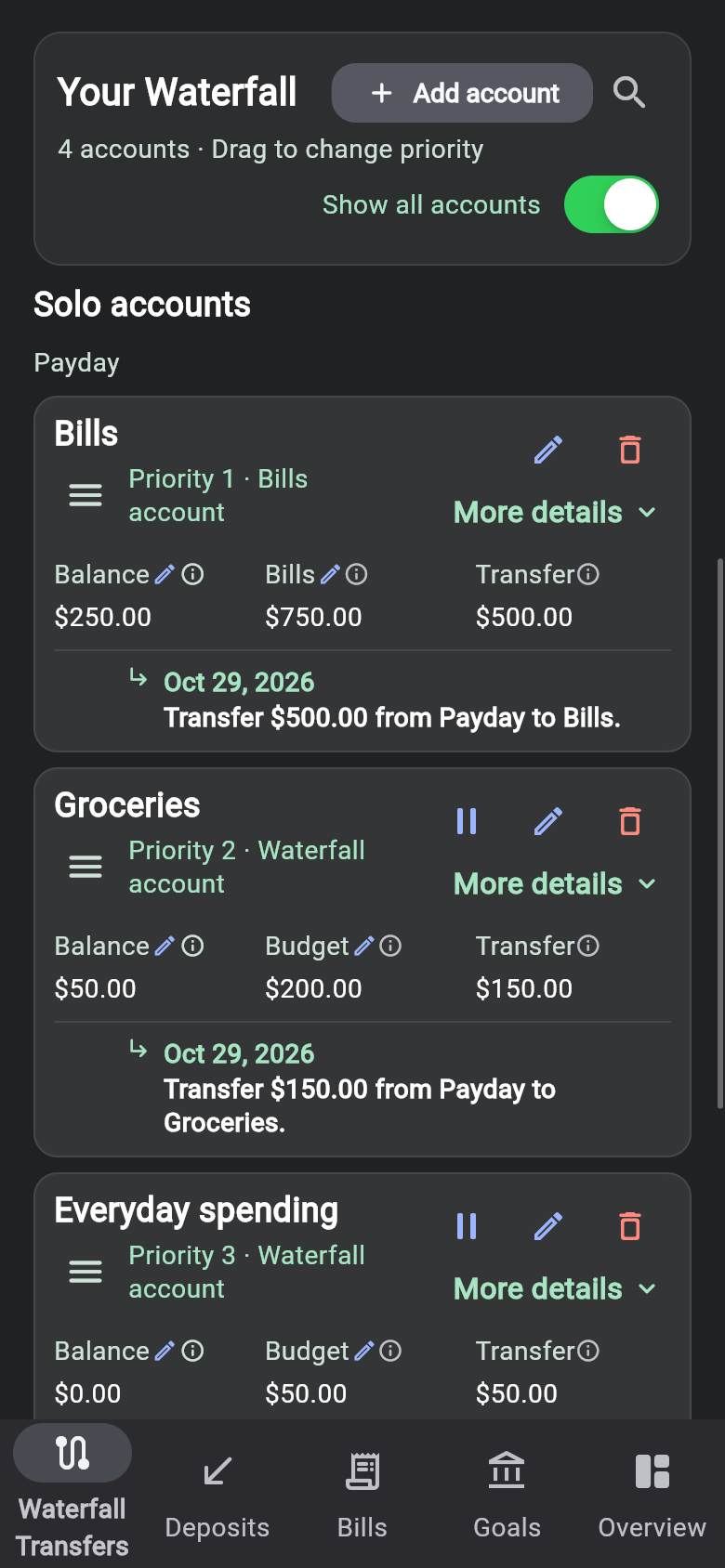
WATERFALL
Assign a bill to an account and its target is worked out in the background. Choose no cushion, a dollar or percentage cushion, or your own refill target. Only the deposits you assign can fund that account.
BILLS & DEPOSITS
Bills are grouped by account and calendar day, with repeat information and search. Annual bills stay findable outside the selected month. Deposits show what is coming in and when.
CREDIT CARDS
Keep the amount owed separate from available cash. Plan transfers for assigned bills before the next eligible deposit. Add more to a card payment if you want, without lowering its bill requirement.
GOALS & OVERVIEW
Plan debt, savings and investment goals from selected deposits. Overview is optional: set up people, responsibilities and shared percentages there to see the household and each person’s totals.
Forecasts use the balances, dates and amounts you enter. They do not read your bank balance or confirm that a real payment has happened.
Pick a profile. Pick up where you left off.
No Save or Load routine. Select a named profile and keep going. Finish an edit with Done; the app keeps your budget and view settings on your device.
How profiles and saving workCreate profiles for the plans you want to keep separate. Every profile includes the same free features.
Undo and redo supported budget actions from the top of the app, with local recovery options in Settings.
Add one profile’s accounts, bills, deposits and goals into another. The source stays unchanged, and a recovery copy is kept before combining.
Everything included.
No subscriptions, paid upgrades or purchase screens. Everyone gets the same budgeting tools.
A definition, right where you need it.
The amount your plan allocates from an assigned deposit to an account on the selected date. Damwise calculates it; you make the transfer.
A little help, when you want it.
Tap the information icons around the app for definitions. Keep the everyday view compact, then open More details when you want to see how an amount was worked out.
Understand your waterfallYour plan is personal.
Your profiles save locally as you use the app. Damwise does not connect to your bank, upload your budget to our servers, or include advertising or analytics services.
Each profile keeps its own budget. Automatic saving is local, not cloud sync or a guaranteed backup. Keep independent copies of important financial records.
Read our privacy policyFind help with profiles, bill targets, goal contributions and your data.